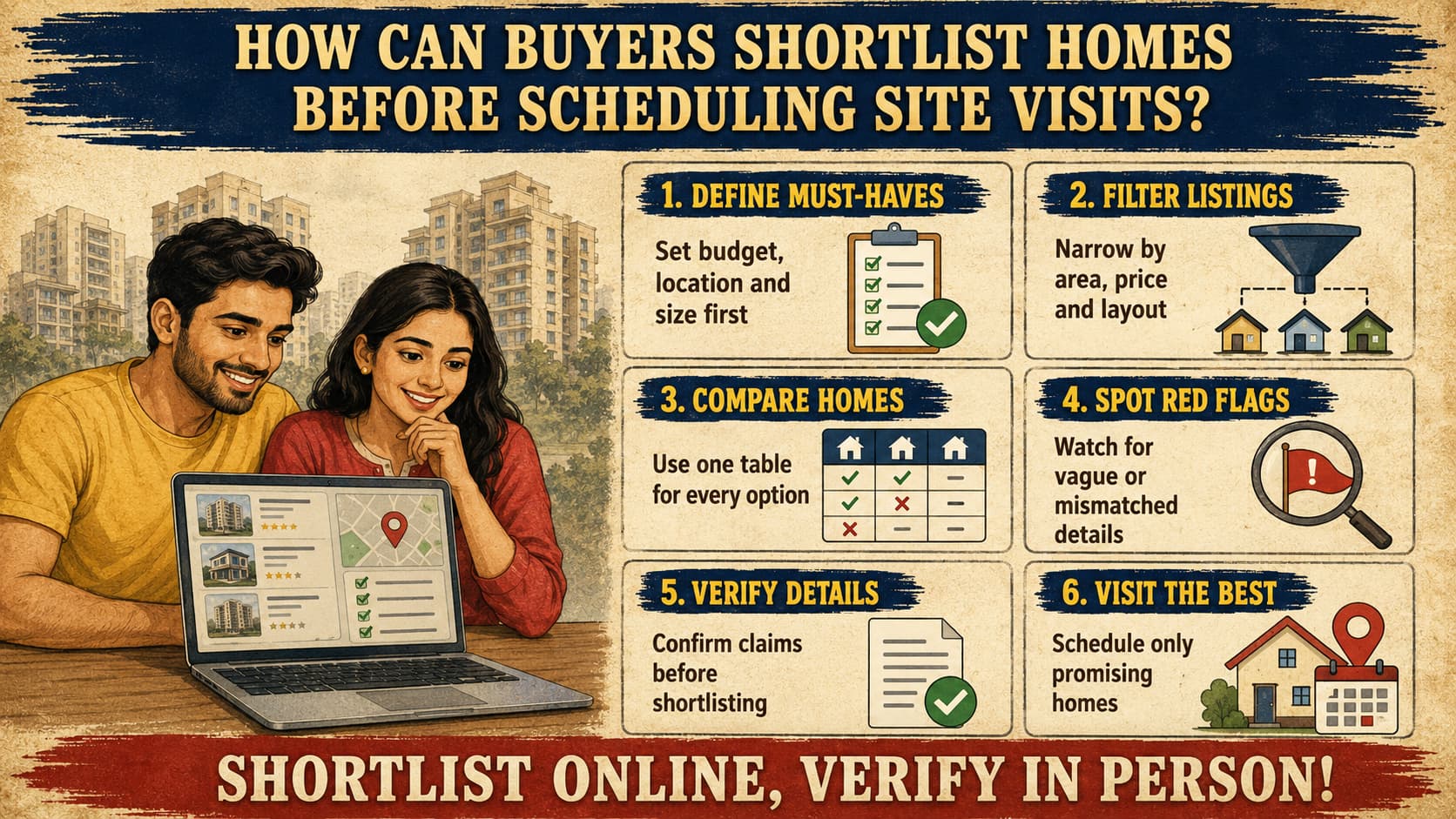
Checking out all houses available on the internet is the quickest way to waste all of your weekend, gas, and nerves. Online listings are intended for you to rule out all the options that are not worth your while before you start traveling, not as an alternative to viewing in person. Pictures only will not tell you if this house suits your lifestyle or not. An efficient shortlist is based on location, budget, size, layout, quality, facilities, connections, paperwork, information about sellers or developers, maintenance, surroundings, and compatibility with your needs.
The main concept is pretty clear – a visit to the site is meant to confirm a good choice, but not to start a basic search. This guide will help you narrow down all the results found online into several houses worth visiting.
How do I shortlist homes before a site visit?
Begin by specifying the absolute requirements that you cannot give up on. Then begin filtering according to the location, price, layout, and other necessary features. Finally, select from the remaining options based on maps, full property details, and verification, and conduct site visits only if there are no serious issues with the property.
Start With Your Non-Negotiable Requirements
Define your requirements before you browse, because attractive photographs can pull you toward homes that fail on basics. Write down:
Maximum budget considering practical financial restrictions
Preferred locations along with acceptable commuting time
Minimum area and minimum bedroom requirement
Type of property, for example, an apartment, builder floor, or an independent home
Proximity to schools and hospitals
Parking requirements
Preferred floor number and acceptable age of the building
Possession time frame
Facilities required by your family
Whether you wish to resale or rent
Then sort each item into one of three groups.
Must-Have: Requirement which disqualifies the listing from consideration when it's not present, such as budget cap, number of bedrooms, or commuting distance.
Prefer-To-Have: Preference which you may give up on, such as an upper floor or a view.
Nice-To-Have: A luxury such as a club house or modular kitchen, which should never determine your short list.
This hierarchy prevents emotional short-listing. A beautifully captured property that doesn't meet your must-haves can simply be deleted from your list.
How to Shortlist Homes Online, Step by Step
A methodical approach is more effective than browsing through hundreds of random ads. Start with general filters and narrow your search down gradually.
Step 1: Location filter. Determine whether the area is suitable for everyday living and not just if it seems interesting.
Step 2: Budget filter. Don’t rely solely on the indicated price as there may be many other factors that may contribute to the overall cost of the property depending on the deal.
Step 3: Size and configuration filter. Make sure you compare actual square footage rather than stated area. Two properties may have the same area but appear quite different due to the differences in layout and calculations.
Step 4: Photos. Analyze photos and check for any inconsistencies in images such as matching rooms and windows, fittings, as well as any distortion effects used in wide angle pictures.
Step 5: Review the whole listing. Headlines will make you see the strong points. The details will expose any weaknesses.
Step 6: Identify the location on the map. Know your surroundings before you get tempted by the interiors.
Step 7: Study the construction or project details. Consider age, amenities, maintenance and level of transparency in the listing.
Step 8: Eliminate the weak matches. Reject anything that does not pass the key criteria, and don’t waste time on something "just in case."
If you conduct a property search on real estate portals in Gurgaon, apply the filters on locality, budget, configuration, and possession status to go through these steps easily. Think of the filtered listings as a base point.
What to Check in an Online Listing Before Contacting the Seller
Before you call an owner, agent or developer, scan the listing for these items:
Exact location and building or project name
Asking price
Area measurement and how it is defined
Configuration and floor
Orientation, where relevant
Age of construction and possession status
Maintenance information
Parking and amenities
Furnishing status
Seller or developer information, where available
Current availability
Photographs and map location
Nearby facilities
Separate out your findings into three groups for different reasons, since their credibility varies.
A verified piece of information is one that you can independently verify through some trusted source such as a mapped location or project specification.
An information piece provided by the seller or real estate agent involves issues like price negotiation, property conditions, amenities and neighborhood. Credible, yet self-reported.
An information piece to be verified concerns issues like unclear or inconsistent data, such as area measurements, possession time periods or facilities.
How to Compare Homes Before a Site Visit
Compare homes using the same criteria every time. A simple table keeps the process objective. Copy this template and fill it in using verified or clearly labeled information.
Verify cells as verified, seller supplied, or unverified. The "Key concerns" row is the most important row. It will become your checklist of items to discuss during the visit. If you would like an even more thorough way of analyzing finalists, an analysis tool that guides you through comparing two homes is available.
How to Evaluate the Surroundings Before Visiting
The home is only one part of the decision. Use online maps and other reliable sources to study:
Nearby roads, major roads and traffic routes
Public transport
Schools, hospitals, grocery stores and markets
Parks, offices and commercial areas
Construction activity and vacant land
Drainage-sensitive or low-lying areas
Potential noise sources
Just because a property looks fantastic in photographs does not mean that it is a good choice, as it could be located near a junction or a building site, or could have drainage problems during periods of heavy rainfall. Satellite images and street views will show things that the photographs do not show. Remember that imagery could be out of date.
How to Identify Red Flags Before Scheduling a Visit
Warning signs online do not prove wrongdoing. They mean you should verify before investing time or money. Watch for:
Incomplete list or ambiguous location
Inconsistencies in the areas listed
Surprisingly vague descriptions
Photos that seem inconsistent to one another and/or the description
Frequent change in asking price
Stale listing or an obviously outdated listing
Contradicting information in different sources
Ambiguous seller's name
Unrealistic promises and/or claimed amenities without further details
Immediate scheduling or commitment pressure
One minor gap may be an oversight. Several together suggest you should ask direct questions and request written clarification first.
How to Check the Asking Price Before Visiting
An initial price comparison helps you spot listings that look unusually high or low. Compare a home against nearby listings that share:
Of equal size and layout
Of similar age
Of similar locality and micro market
Equal floors, furnishing, and parking
Equal amenities and condition
Equal status, be it new or resale
Comparison should be done against similar properties. The online asking prices may not always be final prices. They can vary depending on the negotiation process. Actual transaction evidence such as sale records from official sources should also be considered if available. Online price comparison is just but a preliminary step and does not help determine the actual market value.
How to Check Location and Connectivity Before a Site Visit
Investigate the actual journey, not just the distance. Check:
Work travel from your place to the office
Various modes of public transportation that may be available
Main roads and traffic congestions
Alternatives to use if the main road is not accessible
Roads leading to the office premises and parking areas
The last mile, which is the road from the main road to your place
Take advantage of the features of your map to look up travel times for those hours of day when you will be traveling. Routes that look close by may take longer than you expect because of traffic. You should think about how you would return at night or in the rain.
How to Verify Important Information Before Shortlisting
Before a listing joins your final shortlist, confirm what you can:
Identity of building or project and compatibility with map location
Developer details and progress of project
Approval or registration details, where applicable
Details regarding ownership, where known
Maintenance and possession details
Information provided by the seller or agent
The requirements can be different from one transaction to another, thus, it would be important for you to check from the appropriate official body or from someone who is qualified to do so. Do not consider this guide as your legal advice. Never base any important financial or legal decision from just one listing page alone. It would be good to read a guide about verifying home details before booking.
How to Avoid Unnecessary Site Visits
Use a three-part filter to decide what deserves your time.
Eliminate immediately if the home is:
Outside your budget
In the wrong location
The wrong configuration
No longer available
Missing a non-negotiable requirement
Investigate further if:
Information is incomplete
The price looks unusual
The location needs confirmation
Photographs raise questions
Important claims need verification
Schedule a visit if:
It meets your main requirements
Online information is reasonably consistent
The location and budget both work
No major red flags remain unresolved
You have specific questions that only a physical inspection can answer
This system turns vague browsing into clear decisions.
Create Your Final Shortlist
Keep your physical-visit list manageable rather than visiting every option. No single number suits every buyer, since it depends on your timeline, travel distance and the market. Include only homes that:
Meet your essential requirements
Fit a realistic budget
Have suitable locations
Offer reasonably complete information
Have no major unresolved concerns
Justify the travel and time a visit requires
The purpose of a shortlist is to improve the quality of each visit. Fewer, better-researched visits let you look more carefully at each home.
Prepare Questions Before the Site Visit
Your research should generate questions that only a visit can answer:
Is the actual room size consistent with the listing?
Is the natural light as shown in the photos?
How loud is it at different times of day?
How is the ventilation?
Is parking truly available for your vehicles?
What is the condition of the common areas?
Are there visible maintenance issues?
How is the water supply?
What is the approach road like?
Are there signs of leakage or dampness?
What construction is happening nearby?
What additional costs apply?
Write these down before you go. A prepared visit is more productive than an open-ended walkthrough. For a fuller list, see a dedicated site visit checklist.
Final Pre-Visit Checklist
Save this list and review it before you book any appointment.
Before scheduling:
Location fits my daily routine
Budget fits
Configuration fits
Size is acceptable
Listing information is reasonably complete
Surroundings have been checked
Connectivity has been checked
Price has been compared
Important claims have been identified for verification
No major unresolved red flags
Questions are prepared for the visit
What Online Research Cannot Confirm
Online research narrows your options, but it cannot fully establish:
Actual noise levels
Smells
Ventilation and natural light
Road condition and parking behavior
Building maintenance and quality of common areas
Water pressure
Actual room proportions
Neighborhood atmosphere
Construction disturbance
Use online research to shortlist. Use a physical visit to verify. Neither replaces the other.
Frequently Asked Questions
How do I shortlist homes before a site visit?
Define your must-haves, filter listings by location, budget and configuration, then compare the remaining options in a table. Verify key claims and visit only the homes that pass.
What should I check before scheduling a home visit?
Confirm location, price, size, configuration, availability and surroundings. Check that the listing is complete and consistent, and note any claims you need to verify.
How many homes should I shortlist for physical visits?
There is no universal number. Choose a count that lets you inspect each home carefully without visit fatigue, and include only homes that meet your essentials.
How can I compare homes before visiting them?
Use the same criteria for every option, such as location, budget, size, layout, building age, connectivity, amenities and maintenance. Mark each data point as verified, seller-provided or unconfirmed.
What are common red flags in online listings?
Common signs include inconsistent area figures, vague descriptions, unclear location, repeated price changes, mismatched photographs and pressure to act quickly. A red flag calls for verification, not automatic rejection.
Can online research replace a site visit?
No. It helps you eliminate unsuitable homes and prepare better questions, but noise, light, ventilation, maintenance and neighborhood feel need in-person checking.
Conclusion
Shortlisting online is not about coming to a decision before seeing the property. It is all about ensuring that the properties visited are really worth a visit.
An effective process should go as follows: Define → Filter → Compare → Verify → Shortlist → Visit → Recheck. Define what is needed, filter out the unsuitables, compare the finalists under equal conditions, verify what needs to be verified, and visit the most suitable. And then recheck.
Those buyers who follow the process will end up visiting fewer unsuitable properties during weekends, and they will always know what questions to ask during the visit.