How Can Users Organise Property Enquiries When Comparing Multiple Listings?
In addition to that, you have selected five flats in three different localities. Enquiries have been made, some phone numbers have been noted down and responses received through WhatsApp, emails and phone calls. In a couple of days, you will not be able to remember the flat that had quoted ₹1.35 crore, which one was RERA registered or who assured a response.
It is important to make comparisons but it is even more important to manage communications. This guide will show you how easy it is to keep track of your enquiries, follow ups and visits.
Why Enquiries Get Messy
Buyers and tenants talk to multiple sellers in a span of only a few days. Each one of them responds in their own style and at a different point in time. One sends a brochure; another two photographs; and yet another tells you to just call him up.
Three problems follow:
The information gets dispersed in calls, chats, emails, and screenshots.
Comparisons cannot be made. One builder provides the basic price and the other provides the complete price.
The follow-up is forgotten. Those sellers that do not respond promptly get removed from your list, even though they may have a better property to sell.
A system fixes all three. It does not need to be fancy. A spreadsheet or a notes app is enough.
Step 1: Start With Listings Worth Enquiring About
Do not send enquiries to everything you like. Every enquiry creates a conversation you have to track, so filter first.
Before contacting a seller, check the basics on the listing itself:
Accurate Listing. Are there inconsistencies between pictures and localities provided? Are the contact details accurate? Is it an updated listing? A stagnant listing means wasted effort.
Verification indicators. Ensure that there is some information about how the listing is verified on the platform and if the identity of the owner or agent is known.
RERA Information for new launches. In case you have a new project, take note of the RERA ID and verify it on the official RERA website of your state.
Keep only the listings that pass this check. Three or four solid options are easier to manage than twelve doubtful ones.
Step 2: Build One Enquiry Tracker
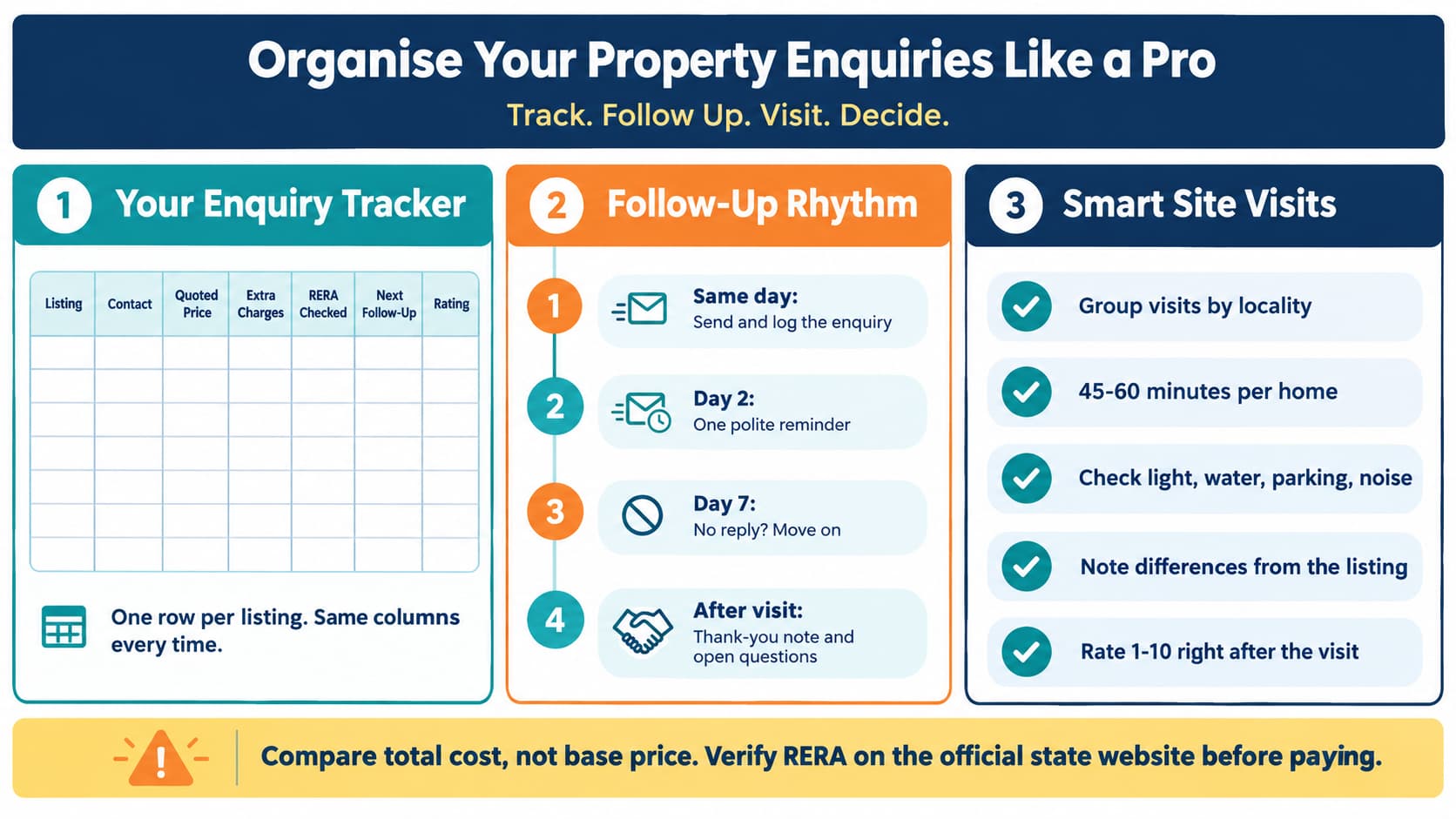
Create a single sheet with one row per listing. Every conversation goes here. Suggested columns:
This is what counts. There is no standard way to present the price offered, and sometimes a lower base price means higher additional costs. It would be good to request a detailed breakup and input all of them in the same format for all listings.
Step 3: Ask the Same Questions Every Time
Send each seller the same set of questions. Identical questions give you identical, comparable answers. Keep them short:
Is the listing still available?
How much is the total price inclusive of all costs?
How much is the monthly maintenance cost and any one time deposit?
For new projects - what is the RERA Registration Number?
What is the possession date?
When can I visit and whom will I meet?
In case of rental property, substitute point 3 and 4 by rent, security deposit, lock-in and notice period.
Copy the replies in your diary immediately after each discussion. In case of a seller replying over phone, send him a quick message like: "Thank you for the call. Just to be clear, you quoted me ₹X inclusive of all taxes, possession in December."
Step 4: Use Platform Features to Keep Things in One Place
Many online platforms let you save listings, shortlist favourites and send enquiries directly from the listing page. Use these features where they exist.
Save/shortlist the ads you are following so that you will land on the same page when revisiting them again in the future.
Try to use enquiry forms wherever possible. These will give you proof of your queries.
Be consistent in using filters (price, location, number of rooms, etc.) so that every search is similar.
Look into privacy settings. Provide your phone number to sellers you wish to follow up with.
On sites like Prooperty, a request for information that comes in from the listing provides you with a first entry and the very same data will be fed into your tracker as well. Whichever site you choose, ensure that you find good contact information, current listings, and error reporting options.
Step 5: Set a Simple Follow-Up Rhythm
Good follow-ups are timed, not frequent.
Same Day: Make the enquiry and record it.
Two Days Without Response: Make one polite follow-up call.
One Week Without Response: Tag the listing “no response” and move on. Those who take their time prior to a sale are not likely to speed up after the sale.
Visit: Follow Up With a Thank You Note Same Day Listing Any Questions Outstanding.
Record each follow-up date in the tracker's "next follow-up" column. Review it every morning. A two-minute review prevents most dropped conversations.
Step 6: Plan Site Visits Around the Shortlist
Now that the tracking tool tells you which listings are worth visiting, arrange your visitations in such a way that comparison would be easier.
Group visits by location. Visit houses in the same location on the same day. This reduces travel time and enables comparison of similar options when the memory is still fresh.
Arrange time blocks. Give at least 45-60 minutes for each visit and allow time for traveling. Book all appointments at least one day before.
Visit homes at different timings if possible. Traffic conditions, sound pollution, availability of parking space, and water supply will vary a lot in a weekend morning compared to a weekday evening.
Carry a short checklist:
Lighting, Ventilation and Leaks
Water Supply and Power Supply
Parking and Accessibility of visitors
Proximity to Metro, Bus Stop, Schools and Market
Condition of Society and Security
Difference from the listing (Area, Floor, Furnishing)
Take photos and short notes immediately. Add your 1 to 10 rating in the tracker before the next visit, while your impressions are fresh.
Step 7: Compare Using Your Tracker, Not Your Memory
After the visits, sort the sheet by total estimated cost, then by your rating. Look at four questions:
Is the total cost within your budget after accounting for all expenses?
Was the seller clear and consistent in their response?
Did the house match the description?
Is the location compatible with your lifestyle?
Write down the answers for each listing next to one another. The answer usually presents itself. When two houses are close, the level of honesty from the seller may very well be the deciding factor.
Take into consideration what is important when looking at the homes for yourself. What is important for a tenant to look at, or for a family? Take those values into consideration when ranking your columns. The local conditions should dictate how you weigh your columns, not just the biggest advertising splash.
Buyers, Tenants, Owners and Agents: Small Differences
The same tracker works for everyone, with minor changes:
The buyers must include the RERA status, payment schedule, and possession date.
The tenants must include the deposit, lock-in period, and notice period.
Both owners and landlords may prepare a similar sheet indicating who is responding and who is not.
Similarly, both agents and builders can use it for tracking the inquiries made.
Mistakes to Avoid
Depending on one’s memory. The finer points fade away within five rounds of conversation.
Using the base price. Always compare the total cost.
Passing on documents or paying money in advance. Never do either until after you have verified the listing, the vendor and, in case of new ventures, the RERA data on the government’s state website.
Pursuing too many listings. Far better to have fewer listings, tracked properly, than more listings not so.
Neglecting warning signals. Evading questions, insistence on prompt payment, changes from round to round, all these are warnings. Keep note of them in your tracker. Consider abandoning that listing.
Disregarding written agreements. Promises made orally are easily forgotten or denied.
A Short Weekly Routine
Monday: Fill in tracker and dispatch pending follow-up emails.
Mid-week: Arrange slots for weekend visit.
Weekend: Go for visit, rate, and record.
Sunday night: Reorganize sheet and dump weaker choices.
After about two or three weeks, most clients will have a definite favorite.
Frequently Asked Questions
What is the best way to track multiple property enquiries?
A single spreadsheet with one row per listing works well. Record the contact, quoted price, extra charges, verification status, follow-up date and visit notes in the same columns for every listing.
How many listings should I enquire about at once?
Three to five is manageable for most people. More than that makes follow-ups and comparisons harder.
How do I compare prices from different sellers?
Ask each one for the total cost, including maintenance, parking, registration and other charges. Compare the all-inclusive figure, not the headline price.
How soon should I follow up if a seller does not reply?
Send one reminder after about two days. If there is still no answer after a week, mark the listing inactive and move on.
Should I verify RERA details before or after visiting?
Before. For new projects, confirm the registration number on the official state RERA website, so you do not spend time on projects you would not consider.
Can I use a notes app instead of a spreadsheet?
Yes. What matters is that you use the same fields for every listing and update them straight after each conversation.
Final Thoughts
Finding good listings is easier than ever. Keeping track of them is where many people struggle. A short checklist, one tracker and a steady follow-up rhythm turn a scattered search into a clear decision. When every answer sits in the same format, you can compare homes calmly and choose with confidence.